
README
View on GitHub ↗Catel
| Name | Badge |
|---|---|
| Downloads |  |
| NuGet stable version |  |
| NuGet unstable version |  |
| Open Collective |   |
Catel is an application development platform with the focus on MVVM (WPF).
For documentation, please visit the documentation portal
Features and components
Below are a few features that are available in Catel.
Catel.Core
Catel.Core is the library you want to include in all your projects, whether you are writing a UI project or not. It contains lots of useful helper methods. The most important features are listed below:
- Argument validation (e.g.
Argument.IsNotNull(() => myArgument)) - Caching
- Data (ModelBase, PropertyBag, Validation)
- Messaging
- Reflection (same reflection API for every supported platform)
- Weak references (WeakEventListener)
And more....
Catel.MVVM
Catel.MVVM is the library you want to include when you are writing a WPF UI project and you want to use the MVVM pattern. Catel provides context-aware view and view-model creation, which can be used to solve the nested user controls problem.
The most important features are listed below:
- Auditing
- Collections (FastObservableCollection)
- Commands (Command, TaskCommand, etc)
- Converters (tons of converters out of the box)
- Services
- MessageService
- NavigationService
- OpenFileService
- BusyIndicatorService
- SaveFileService
- UIVisualizerService
- View models
- Automatic validation
- Automatic mappings from model to view model
- Views
- DataWindow
- UserControl
- Window
Example code
Models
This model has automatic change notifications and validation.
public class Person : ValidatableModelBase
{
    public string FirstName { get; set; }

    public string LastName { get; set; }

    protected override void ValidateFields(List<IFieldValidationResult> validationResults)
    {
        if (string.IsNullOrWhitespace(FirstName))
        {
            validationResults.Add(FieldValidationResult.CreateError(nameof(FirstName), "First name is required"));
        }

        if (string.IsNullOrWhitespace(LastName))
        {
            validationResults.Add(FieldValidationResult.CreateError(nameof(LastName), "Last name is required"));
        }
    }
}
View models
This is a view model with:
- Automatic injection of the DataContext
- Automatic mapping of properties & validation from model => view model
public class PersonViewModel : ViewModelBase
{
    public PersonViewModel(Person person)
    {
        Argument.IsNotNull(() => person);

        Person = person;
    }

    [Model]
    private Person Person { get; set; }

    [ViewModelToModel]
    public string FirstName { get; set; }

    [ViewModelToModel]
    public string LastName { get; set; }
}
How to contribute
Support on Open Collective
Please consider supporting Catel on Open Collective.
Translating
To add translations to Catel, the Multilingual App Toolkit (MAT) is required.
- Download the MAT Editor
- Open your specific language (or create it) in the
MultilingualResourcesfolder, e.g../src/Catel.MVVM/MultilingualResources/Catel.MVVM.nl.xlf - Edit the xlf file and create a pull request (PR) with only this file
Building Catel
Prerequisites
Catel requires Visual Studio 2022 to compile successfully. You also need to ensure you have the following features installed:
Note that the .vsconfig in the src root should notify about missing components when opening the solution.
Note that you should run these commands using powershell in the root of the repository.
Running a build
.\build.ps1 -target build
Running a build with unit tests
.\build.ps1 -target buildandtest
Running a build with local packages
Note that this assumes a local packages directory at C:\Source\_packages, which can be added to the NuGet feeds:
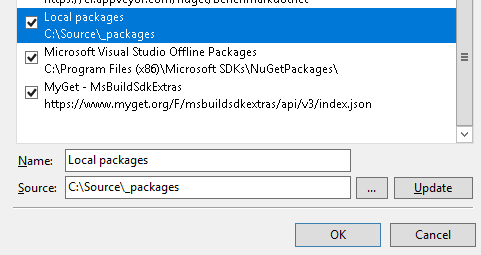
.\build.ps1 -target buildandpackagelocal
WPF components based on Catel
If you are planning on using WPF, there is a huge set (60+) of free open-source components available based on Catel. All these open source are developed by a company called WildGums (see https://www.wildgums.com) and provided to the community for free. The components are well maintained and being used in several commercial WPF applications.
For more information, see https://github.com/wildgums
Contributors
This project exists thanks to all the people who contribute. [Contribute].

Backers
Thank you to all our backers! 🙏 [Become a backer]

Sponsors
Support this project by becoming a sponsor. Your logo will show up here with a link to your website. [Become a sponsor]